Manual Buttons & the Panel
On-chart LONG, SHORT, CLOSE, and Move-to-BE buttons, so your own trades get the same bracket, step-trail, and target-chase management as the automated modules. The status panel always shows the bot's current condition and the reason.
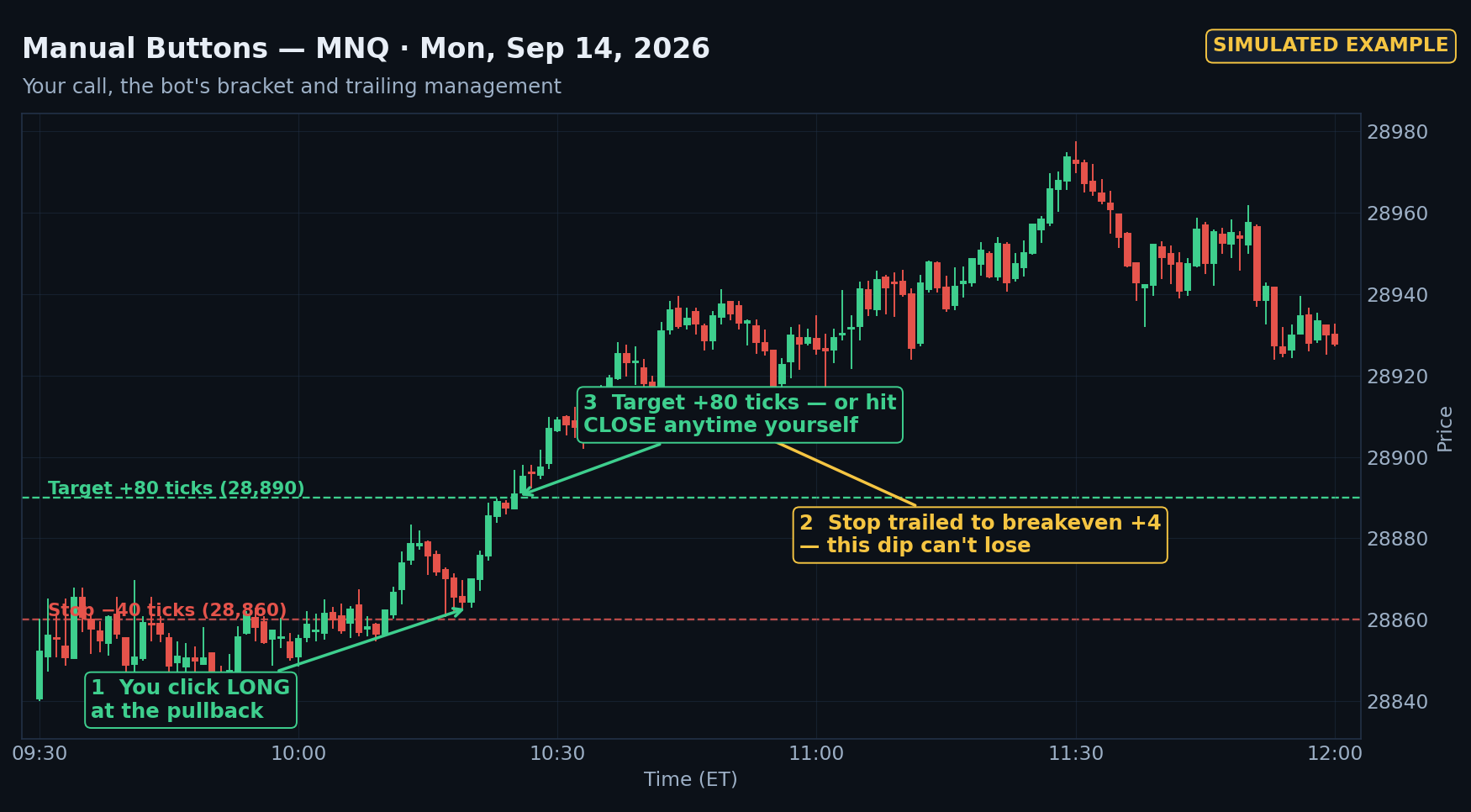
Watch it work
What's customizable
| Manual button stop (ticks) | 40 |
|---|---|
| Manual button target (ticks) | 80 |
| Step trail, stop-sized steps | ON |
| Breakeven trigger (ticks) | 40 |
| Trail step (ticks) | 40 |
| Breakeven plus (ticks) | 4 |
| Target chase | ON |
| Chase trigger: within (ticks) | 10 |
| Chase: extend target by (ticks) | 20 |
| Chase: stop locked under target (ticks) | 20 |
| Cap target at next zone | OFF |
| Zone buffer (ticks) | 4 |
Every module also shares the session and management settings: session open and range start (09:30 ET), entry cutoff (11:30 ET), flatten time (15:55 ET), contracts per trade (1), and the EnforceSimOnly safety switch (ON) — all adjustable.
Get FusionBot
Every license includes 1 symbol seat, the full manual, and free updates while your license is active. Also available in the Bundle.